How I built a native macOS app from my phone in one afternoon
Table of Contents
I work a lot in tmux sessions over SSH. Remote server, terminal, no GUI. And there’s one thing you simply can’t do in this environment — drag and drop.
Need to send a file to a server? Open a new terminal, type scp, try to remember the path, copy, paste. Or throw it on some cloud service and get a link that expires in an hour. A waste of time every single time.
I wanted something simple: drop a file on a menu bar icon and get the server path in my clipboard. Nothing more.
An afternoon with a phone in hand
I wasn’t sitting at a computer. I had my phone, SSH access to a remote server running Claude Code, and an idea.
I started the way I always start — with proper research. Claude Code explored how SFTP works in Swift, what the options are for menu bar apps on macOS, how to handle SSH keys and Keychain integration. Then I had it write a detailed plan.
“Research and planning were the key. With a solid brief, Claude Code wrote almost the entire app on the first try.
”
The plan had a clear structure: menu bar icon, drag & drop handler, SFTP upload engine, Keychain for credentials, Preferences panel for configuration. Claude Code took it and started writing Swift code.
And here’s the thing — the entire core functionality worked almost oneshot. Drop a file on the menu bar → SFTP upload → path in clipboard. First try.
CI pipeline from a phone
A Swift app needs to be built on macOS. I was sitting with a phone and an SSH terminal on a Linux server. Solution? GitHub Actions.
Claude Code set up a CI pipeline that builds the macOS app on GitHub runners. Push code → Actions builds → I get an .app bundle. All through git from the command line.
Debugging from a phone looked like this: check the build log in GitHub Actions, tell Claude Code what to fix, it commits, pushes, wait for the next build. Repeat.
I won’t say it was comfortable. But it worked. And most importantly — the app was functional by the end of the day.
2 hours at the computer
The next day I sat down at my Mac. The functionality was running. What was missing was polish.
The menu bar icon had to look right — clean, modern, working in both dark and light mode. The SwiftUI preferences panel needed tweaking. Upload progress indicator. Completion notifications.
This took about 2 hours. Visual details, UX, final polishing. The functionality was there — it just needed to look like a proper macOS app, not a prototype.
What DropShot does
Technically: Swift 5.9, SwiftUI, macOS 13+. Localized in English and Czech. VoiceOver support. Respects Reduce Motion.
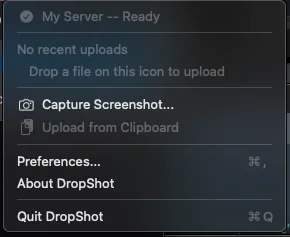
Why I’m writing this
This story isn’t about DropShot. It’s about what happens when you have a solid plan and an AI tool that can execute it.
In one afternoon — from a phone — a functional native macOS app was born. Not a prototype, not a mockup. An app that solves a real problem and that I use every day.
“A native macOS app in Swift. In an afternoon. From a phone. That’s the kind of shift most people can’t imagine until they see it.
”
Not theoretical AI possibilities — but real results on real projects.
DropShot is open source and free.
If you’re interested in how AI tools can transform your team’s productivity — get in touch.
You might also like
- 5 Tools I built for Claude Code
- A 7-week project in 1.5 hours
- Why 90% of AI trainings end up changing nothing
An overview of everything I build is in the Tools section.
Free Claude Code cheat sheet
Commands, prompts, plugins and workflows from €3,000/day workshops. Download free.
Get the cheat sheet →